
Sales
Turn demand into a pipeline record you can run.
Included in the full ERP. Modules are not sold individually.
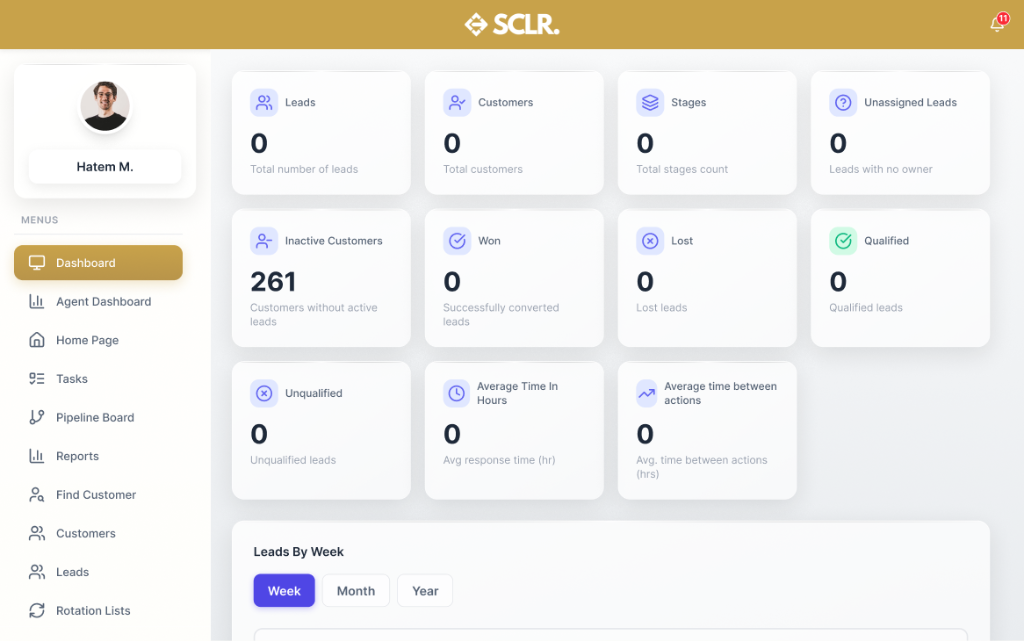
What the SCLR sales module changes
Lead sources stay attached. Every Meta form, channel, and project turns into a lead record you can track and report on.
Follow-ups stop being random. Calls, meetings, and tasks live on the lead. Managers see last action and response time.
Ownership becomes automatic. Rotation lists assign leads by rules, so nothing sits unowned.
Managers get a real view. Filter performance by agent, team, stage, and source. Export clean reports when needed.
What it manages
Records
Documents and entities
Records
- • Leads
- • Customers
- • Projects
- • Activities (calls, meetings, tasks)
- • Sources, channels, forms
Actions
Core operations
Actions
- • Create and qualify leads
- • Assign leads (rotation lists)
- • Log calls and meetings
- • Schedule tasks and follow-ups
- • Update stages and statuses
Controls
Rules and permissions
Controls
- • Role-based visibility (agent vs manager)
- • Assignment rules (rotation lists by criteria)
- • SLA and inactivity handling (reassign rules)
- • Audit logs on lead changes
Reporting
Visibility and insights
Reporting
- • Leads, customers, won, lost
- • Response time and time between actions
- • Performance by user, team, project
- • Source, channel, and form breakdown
How sales connects inside SCLR
Every record you create in Scaler updates the connected records across the system.
Map Meta forms to a project. Every submission becomes a tracked lead.
The lead is created automatically. Source and form stay attached.
Leads route to the right agent without manual assignment.
Once the deal is closed, the contract schedule becomes the source of truth.
The payment hits Finance as a real ledger entry. No re-entry, no exports.
Import your data your way
Flexible import options that make it easy to switch from your current system.
Add records as you go
Simple forms. Clean records from day one.
Import in bulk
Ready-made sheet structures. Fast setup without messy fields.
Data to start Sales
Import the basics first so you can capture leads, assign ownership, and track deals. You can migrate active pipeline later.
Customers and contacts
Customers and contacts
- • Customer name
- • Contact name
- • Phone number
Projects (if used)
Projects (if used)
- • Project names
- • Locations
- • Launch dates
Lead sources
Lead sources
- • Sources
- • Channels
- • Forms (if using Meta lead forms)
Sales team structure
Sales team structure
- • Users (agents)
- • Teams
- • Branches
- • Roles or positions
Bringing existing work
into Scaler?
Open pipeline
- • Leads with stage and status
- • Last action date
- • Owner or assignee
Activity history (optional)
- • Calls
- • Meetings
- • Tasks
- • Notes
What happens next
- • Leads route to the right owner based on teams and rules
- • Pipeline stages update forecasting and handoffs
- • Activities stay attached to the same lead record
- • The same records feed reporting without exports
Other Modules
Procurement
Vendors, RFQs, quotations, POs, supplier invoices, and payments.
Marketing
Lead capture with channel tracking and conversion reporting from lead to outcome.
HR
Employee records, reporting lines, attendance, leaves, and approvals.
Payroll
Contracts, pay structures, payruns, payslips, and finance posting.
Finance
Draft-to-published control, statements, and audit-ready reporting.
Property Management
Projects, units, contracts, and payment schedules tied to finance.
Warehouse Management
Receiving, picking, batch/expiry tracking, and location-level control.
AI built in, not bolted on
Every module comes with AI assistance that understands your workflow and helps you move faster.
AI credits are purchased separately. All plans include basic AI functionality.
Ask and find
Find any record or transaction fast. Filter by status, date, and related records.
Explain and summarize
Summarize activity across records. Spot patterns, bottlenecks, and exceptions.
Prepare actions
Draft updates and prepare workflows. Push the next step forward with approval.
Choose the next step.
Talk to the team
Use this if the setup involves complex structure, migration, or integrations.
Book a call