
HR
Employee records, organizational structure, and leave management in one controlled system.
Included in the full ERP. Modules are not sold individually.
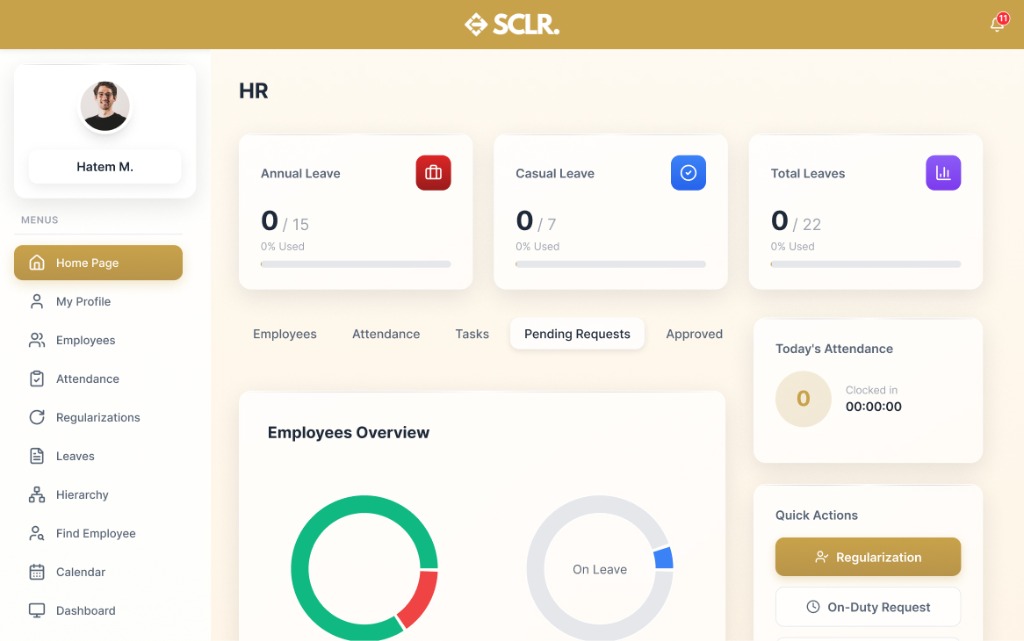
What the SCLR hr module changes
Employee onboarding becomes structured. New hires are added with contracts, reporting lines, and access permissions in one flow.
Organizational visibility becomes clear. See reporting hierarchies, department structures, and team composition at a glance.
Leave management becomes transparent. Employees request leave, managers approve, and balances update automatically without spreadsheets.
Records become auditable. Track every change to employee data, role assignments, and contract modifications with full history.
What it manages
Records
Documents and entities
Records
- • Employee profiles and personal data
- • Employment contracts and terms
- • Organizational hierarchy and reporting lines
- • Leave balances and entitlements
- • Performance and review records
Actions
Core operations
Actions
- • Onboard new employees
- • Update employee information
- • Assign roles and departments
- • Process leave requests
- • Conduct performance reviews
Controls
Rules and permissions
Controls
- • Role-based access (HR vs manager vs employee)
- • Approval workflows for leave and changes
- • Data privacy and access restrictions
- • Document version control
Reporting
Visibility and insights
Reporting
- • Headcount by department and location
- • Leave balances and absence trends
- • Contract expiry and renewal tracking
- • Organizational charts and hierarchy views
How hr connects inside SCLR
Every record you create in Scaler updates the connected records across the system.
Employee data flows to Payroll automatically. New hires, salary changes, and contract updates sync without re-entry.
Leave requests update attendance records. Approved absences are visible to managers and reflected in time tracking.
Access permissions control what employees see across modules. HR sets roles, and the system enforces boundaries.
Payroll runs are managed seamlessly. Ensure timely and accurate salary disbursements with automated processes.
Import your data your way
Flexible import options that make it easy to switch from your current system.
Add employees as you go
Simple forms for employee profiles, contracts, and organizational placement. Build your structure step by step.
Import in bulk
Ready-made sheet structures for employee master data, organizational hierarchy, and historical records.
Data to start HR
Import core employee data and organizational structure first. Historical records and detailed documentation can be added progressively.
Employee information
Employee information
- • Employee name and ID
- • Contact details (email, phone)
- • Date of birth and nationality
- • Employment start date
Employment details
Employment details
- • Job title and position
- • Department and location
- • Employment type (full-time, part-time, contract)
- • Reporting manager
Organizational structure
Organizational structure
- • Department names and codes
- • Reporting hierarchies
- • Cost centers
- • Location and branch information
Leave entitlements
Leave entitlements
- • Annual leave policies
- • Leave types (sick, annual, unpaid)
- • Leave balances carried forward
- • Public holiday calendars
Bringing existing work
into Scaler?
Historical employee records
- • Previous employment history
- • Past performance reviews
- • Historical leave records
Documents and files (optional)
- • Employment contracts (PDFs)
- • Identification documents
- • Certification and qualification records
- • Previous correspondence
What happens next
- • Employees appear in Payroll automatically
- • Leave requests flow through approval workflows
- • Reporting lines control access and visibility
- • Contract expiry alerts keep renewals on track
Other Modules
Procurement
Vendors, RFQs, quotations, POs, supplier invoices, and payments.
Sales
Pipeline, tasks, SLAs, and team performance tied to one lead record.
Marketing
Lead capture with channel tracking and conversion reporting from lead to outcome.
Payroll
Contracts, pay structures, payruns, payslips, and finance posting.
Finance
Draft-to-published control, statements, and audit-ready reporting.
Property Management
Projects, units, contracts, and payment schedules tied to finance.
Warehouse Management
Receiving, picking, batch/expiry tracking, and location-level control.
AI built in, not bolted on
Every module comes with AI assistance that understands your workflow and helps you move faster.
AI credits are purchased separately. All plans include basic AI functionality.
Ask and find
Find any record or transaction fast. Filter by status, date, and related records.
Explain and summarize
Summarize activity across records. Spot patterns, bottlenecks, and exceptions.
Prepare actions
Draft updates and prepare workflows. Push the next step forward with approval.
Choose the next step.
Talk to the team
Use this if the setup involves complex structure, migration, or integrations.
Book a call