
Finance
Turn transactions into a complete financial record you can audit and trust.
Included in the full ERP. Modules are not sold individually.
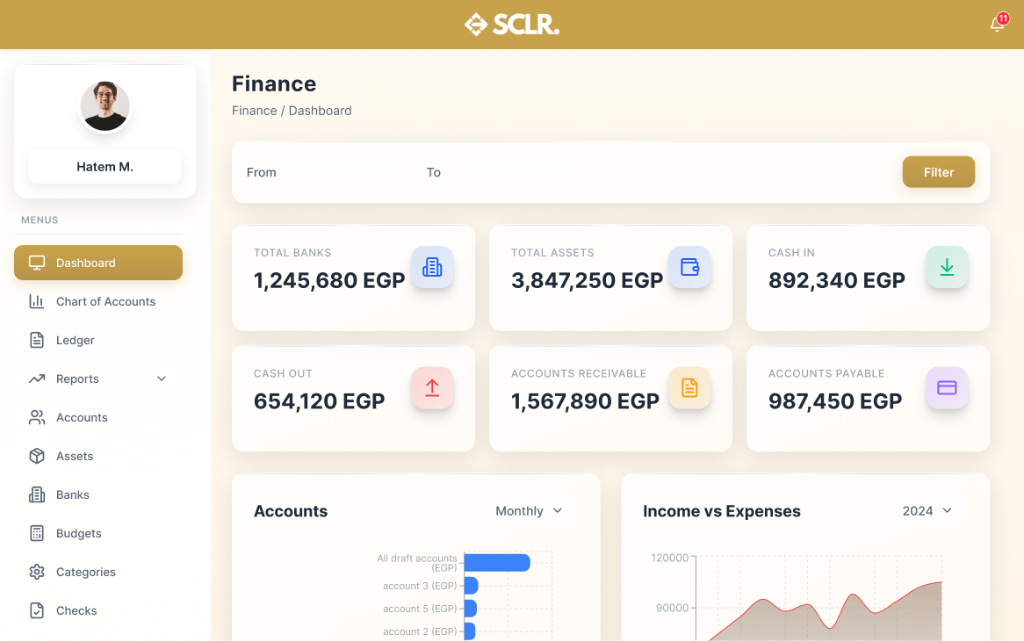
What the SCLR finance module changes
Bank reconciliation becomes automatic. Every transaction flows into the ledger with source documents attached, so month-end closes faster.
Visibility replaces guesswork. Real-time cash position, AR aging, and AP schedules stay current without waiting for reports.
Compliance stops being reactive. Approval workflows, audit trails, and document retention happen by design, not as an afterthought.
Reporting becomes self-service. P&L, balance sheet, and custom reports pull live data. Export clean files when auditors ask.
What it manages
Records
Documents and entities
Records
- • Chart of accounts
- • General ledger entries
- • Bank accounts and transactions
- • Invoices (AR and AP)
- • Journal entries and adjustments
Actions
Core operations
Actions
- • Record and categorize transactions
- • Reconcile bank accounts
- • Create and approve journal entries
- • Process payments and receipts
- • Close periods and lock books
Controls
Rules and permissions
Controls
- • Role-based access (accountant vs controller)
- • Approval workflows for journal entries
- • Period locks and audit trails
- • Document attachment requirements
Reporting
Visibility and insights
Reporting
- • P&L, balance sheet, cash flow
- • AR aging and collection status
- • AP schedules and payment forecasts
- • Budget vs actual variance
How finance connects inside SCLR
Every record you create in Scaler updates the connected records across the system.
Every invoice from Procurement flows into AP. Every sale creates an AR entry. The ledger stays synchronized.
P&L reports pull live data from all modules. Revenue, COGS, and expenses update as transactions happen.
Budget tracking shows planned vs actual spend across departments. Alerts trigger when thresholds are exceeded.
Check printing and tracking connect to bank accounts. Every outbound payment is logged with payee details and cleared status.
Financial statements generate automatically from categorized transactions. View P&L, balance sheet, and cash flow reports with real-time accuracy.
Import your data your way
Flexible import options that make it easy to switch from your current system.
Add transactions as you go
Simple forms for journal entries, payments, and receipts. Clean records from day one.
Import in bulk
Ready-made sheet structures for chart of accounts, opening balances, and transaction history.
Data to start Finance
Import the basics first so you can start recording transactions, reconciling accounts, and generating reports. Historical data can be migrated later.
Chart of accounts
Chart of accounts
- • Account codes
- • Account names
- • Account types (asset, liability, equity, revenue, expense)
- • Opening balances
Bank accounts
Bank accounts
- • Bank names
- • Account numbers
- • Currency
- • Current balances
Customers and vendors
Customers and vendors
- • Customer names and contacts
- • Vendor names and contacts
- • Payment terms
- • Outstanding balances (AR/AP)
Financial team structure
Financial team structure
- • Users (accountants, controllers)
- • Departments or cost centers
- • Approval hierarchies
- • Roles and permissions
Bringing existing work
into Scaler?
Open invoices
- • AR invoices with due dates
- • AP invoices with payment schedules
- • Partial payments and credits
Historical transactions (optional)
- • Prior period journal entries
- • Bank transaction history
- • Reconciliation records
- • Audit trail documentation
What happens next
- • Transactions route to the right accounts automatically
- • Bank feeds reconcile against ledger entries in real-time
- • Period closes lock the books with full audit trails
- • Reports pull live data without manual exports
Other Modules
Procurement
Vendors, RFQs, quotations, POs, supplier invoices, and payments.
Sales
Pipeline, tasks, SLAs, and team performance tied to one lead record.
Marketing
Lead capture with channel tracking and conversion reporting from lead to outcome.
HR
Employee records, reporting lines, attendance, leaves, and approvals.
Payroll
Contracts, pay structures, payruns, payslips, and finance posting.
Property Management
Projects, units, contracts, and payment schedules tied to finance.
Warehouse Management
Receiving, picking, batch/expiry tracking, and location-level control.
AI built in, not bolted on
Every module comes with AI assistance that understands your workflow and helps you move faster.
AI credits are purchased separately. All plans include basic AI functionality.
Ask and find
Find any record or transaction fast. Filter by status, date, and related records.
Explain and summarize
Summarize activity across records. Spot patterns, bottlenecks, and exceptions.
Prepare actions
Draft updates and prepare workflows. Push the next step forward with approval.
Choose the next step.
Talk to the team
Use this if the setup involves complex structure, migration, or integrations.
Book a call